
Online wedding RSVP — every reply in one table
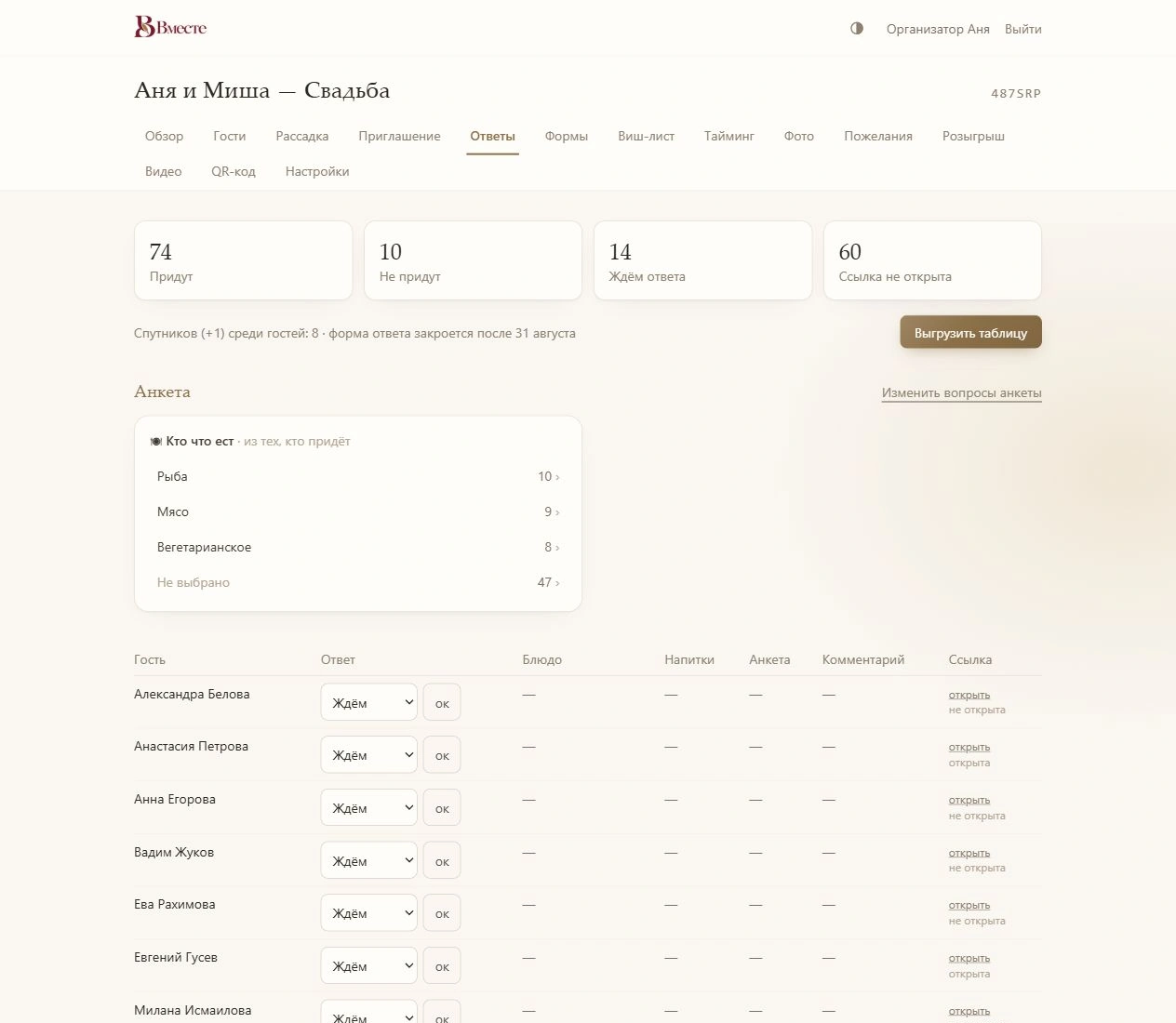
A wedding RSVP is the short form where guests confirm whether they’re coming and answer your questions. In Vmeste it’s built into the online invitation: each guest opens their own link, says whether they’ll come and with whom, picks a meal and drinks, and the reply shows up in your dashboard straight away — no chasing, no manual spreadsheet.
- Attendance, plus-one, meal and drinks — the basics are ready to go
- Custom questions: text, choices, dropdowns, ratings, dates
- Song requests your DJ sees through their own link
- An RSVP deadline: the form closes after the date you set
What you can ask your guests
Start with the ready-made set and add only what actually affects your planning. The shorter the form, the faster people reply.
Attendance
“Joyfully accept” or “regretfully decline” — the answer your menu, seating and headcount depend on.
Plus-one
If you’ve allowed a guest to bring someone, the form asks for their companion’s name. The companion is added to your guest list.
Meals and drinks
Guests choose a main course from your menu and tick their drinks. Your dashboard shows how many portions of each dish to order.
Custom questions
Short or long text, single or multiple choice, dropdowns, ratings and dates. Any question can be made required.
Song requests
Guests name the song that will get them dancing. Your MC and DJ see the list through their own link — with no access to your account.
Comments
A free-text field for everything else: allergies, a high chair, arriving late.
How to collect wedding RSVPs online
Set up the form
Keep the questions you need from the ready-made set, add your own and set an RSVP deadline.
Send personal links
Every guest gets their own link to the invitation with the RSVP form. Their reply lands in their row on your list.
Track replies
Your dashboard shows who’s coming, who declined, who hasn’t replied and who hasn’t even opened the link — so you know exactly whom to remind.
Export the table
Download replies as a CSV file that opens in Excel or Google Sheets — handy for sending meal counts to the caterer and the list to your planner.
RSVP in the invitation vs. a separate form or texts
| Vmeste RSVP | Separate online form | Texts and calls | |
|---|---|---|---|
| Who replied | Tied to the guest via their personal link | Guests type their own name — duplicates and typos happen | You match them up by hand |
| Who hasn’t opened the invitation | Shown in your dashboard | Not visible | Not visible |
| Meal counts | Counted automatically | Needs a summary sheet | By hand |
| Link to seating | Same guest list | Copy across by hand | Copy across by hand |
| Changing a reply | Same link, while the form is open | Depends on the form settings | Another message |
Frequently asked questions
What does RSVP mean?
RSVP stands for the French “répondez s’il vous plaît” — “please reply”. On a wedding invitation it’s the request to confirm whether you’re coming, and the reply itself.
What questions should a wedding RSVP ask?
The essentials are whether the guest is coming and whether they’re bringing a plus-one. Beyond that, only ask what changes your planning: meal choice, drinks, allergies, transport or accommodation, a favourite song. See how to collect wedding RSVPs online.
When should the RSVP deadline be?
Three to four weeks before the wedding usually works — enough time to give the venue final numbers and meal choices and to finish the seating chart. Check the exact date your venue needs.
Can guests change their reply?
Yes, through the same link while the form is open. After the deadline the form closes, and any further changes are made by you in the dashboard.
What if a guest doesn’t reply?
Check in your dashboard whether they’ve opened the invitation. If not, the message may have been missed, so resend the link. If they opened it but didn’t reply, send a friendly personal reminder a few days before the deadline.
Can I export RSVPs to Excel?
Yes. Replies download as a CSV file that opens in Excel or Google Sheets with proper columns.
Helpful reading
- GuestsHow to collect wedding RSVPs online
Which questions to ask, when to set the RSVP deadline and how to nudge guests who go quiet.
- InvitationsWedding invitation wording: 30 examples
30 ready-to-use examples in every tone, and the details every invitation needs so guests don’t have to ask.
- SeatingHow to make a wedding seating chart
A step-by-step method from guest groups to table cards — plus the etiquette that keeps everyone happy.
Collect RSVPs without the chasing
An RSVP form inside your invitation, a personal link for every guest and every reply in one table.